Portable Power Station vs UPS: Which Should You Choose? (November 2026)
Choose a UPS for nearly instant protection, or a portable power station for longer runtime and flexible backup power. Some power stations also include UPS mode, but their transfer time and output limits still matter.
On this page (8 sections)
- Portable power station vs UPS: which is better?
- How does UPS transfer time affect backup?
- Which gives you more runtime?
- Which portable power station should you choose?
- What should you check before using a power station as a UPS?
- Can a portable power station run a CPAP machine?
- How do charging and portability compare?
- Portable power station vs UPS: what is the final choice?
Choose a UPS for near-instant outage protection, or a portable power station for longer runtime and easier transport. The best portable power station vs UPS choice depends on transfer time, battery capacity, connected wattage and whether you need backup outside one room.
A traditional UPS is built around automatic switchover during a power failure. A portable power station is built around stored energy, multiple output types and flexible charging, although some models also offer UPS operation.
This comparison focuses on backup behavior, runtime, output, portability and use with devices that may react badly to an interruption.
 Best for portable device backup
Jackery Explorer 300 Portable Power Station
 Best for longer home backup
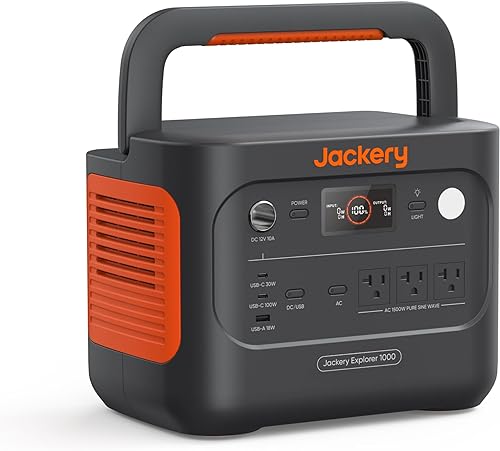
Jackery Explorer 1000 v2 Portable Power Station
Portable power station vs UPS: which is better?
A UPS is the safer starting point for interruption-sensitive equipment, while a power station is usually better for longer outages and portable use. A power station with a clearly stated UPS transfer time can cover both needs.
The key difference is what happens when utility power stops. A standard UPS is designed to detect the outage and switch its connected load to battery power.
A basic power station may simply provide battery power when you turn it on or connect a device.
That distinction matters for networking equipment, computers, communication devices and some medical equipment. Even a short interruption can cause a restart, so don't assume that every AC outlet on a battery station behaves like a UPS.
The best portable battery power station guide explains the wider features to compare, including capacity, output and charging choices.
How does UPS transfer time affect backup?
Transfer time tells you how quickly a UPS-equipped power station changes from utility power to battery power. A shorter stated time gives interruption-sensitive equipment less time without power, but it doesn't guarantee compatibility with every device.
The Jackery Explorer 1000 v2 lists a 20ms UPS function. The EF ECOFLOW RIVER 3 230 lists automatic switching under 20ms.
The Explorer 300 has 2 AC outlets and 300W rated output, but the product information here does not identify a UPS transfer time. Treat it as a portable battery station unless the exact operating instructions confirm UPS behavior for your intended setup.
Transfer time is only one part of the decision. Check the device's input requirements, the power station's output rating and the manufacturer's instructions before relying on any model for equipment that cannot tolerate an interruption.
Is a portable power station with UPS good for a freezer?
A UPS-equipped power station may help during a short outage, but a freezer also needs enough starting and running power. Motor-driven appliances can draw more power when starting than they use after they are running.
The Explorer 300 has a 300W rated output and automatically shuts off if overloaded. That makes it a poor match for a freezer unless the freezer's startup and running requirements stay within the station's limits.
The Explorer 1000 v2 provides 1,500W output and lists fridges among the appliances it can power. The RIVER 3 230 has 300W AC output and can power up to 600W appliances with X-Boost, but X-Boost does not change its listed 300W AC output.
For freezer backup, check the exact appliance label and manual. Our guide to portable power station vs generator covers the wider choice between battery backup and fuel-powered generation.
Which gives you more runtime?
Battery capacity usually decides the runtime gap, and the Explorer 1000 v2 has the largest capacity here at 1,070Wh. The Explorer 300 provides 292Wh, while the RIVER 3 230 provides 230Wh.
A basic estimate starts with:
Estimated runtime = watt-hours ÷ device watts
Real use is lower than the simple division because power conversion creates losses and some stations use energy for their own operation. A 60W device would place a much smaller load on a 1,070Wh station than on a 230Wh station, but the exact runtime still depends on the setup.
Use the Explorer 300 for lighter loads such as laptops, cameras and drones when its 300W rating fits. Its 7.5 lb weight makes it easier to carry than the larger Jackery.
Choose the Explorer 1000 v2 when an outage may last longer or several devices need power at once. Its 1,070Wh capacity and 1,500W output give it a much wider operating range, but its 23.8 lb weight makes it less convenient to move.
The RIVER 3 230 sits closer to the Explorer 300 in capacity and output. Its advantage is the listed under-20ms UPS mode, not the longest runtime in this group.
Which portable power station should you choose?
Choose the Jackery Explorer 300 for light, portable loads; choose the Explorer 1000 v2 for longer backup; choose the RIVER 3 230 when compact UPS switching is the priority. The scores reflect how each model fits the needs of this comparison.
Jackery Explorer 300 Portable Power Station
The Explorer 300 has a 292Wh capacity, weighs 7.5 lb and includes 2 AC outlets, a 100W USB-C PD port, 2 USB-A ports and a 120W car port. Its rated output is 300W, with a 600W peak surge.
This layout suits a small set of personal devices rather than a whole-home backup plan. You can carry it to a campsite, keep it near communication gear or use it as a battery source for devices under its output limit.
Jackery identifies LiFePO4 battery chemistry and over 4,000 charge cycles before the battery reaches 70% capacity. It can charge devices while it is being recharged, and its listed recharge options include USB-C, a car port and a Jackery SolarSaga 100W solar panel sold separately.
Its main trade-off in this comparison is UPS uncertainty. The data supplied here does not state a transfer time, so choose it for portable power unless the exact instructions confirm UPS operation for your device.
Jackery Explorer 1000 v2 Portable Power Station
The Explorer 1000 v2 has a 1,070Wh capacity, 1,500W output and 3 pure sine wave AC ports. It weighs 23.8 lb and has a foldable handle.
Its listed 20ms UPS function makes it the strongest fit here when you want both longer runtime and automatic backup behavior. Three AC ports also make it easier to connect several devices, provided their combined demand stays within the station's output limits.
The Jackery app offers emergency charging, a 30 dB quiet overnight charging mode and an energy efficiency mode. Emergency charging can take the battery from 0% to 100% in 1 hour when enabled in the app, while the default full-charge mode is 1.7 hours.
The Explorer 1000 v2 uses an LFP battery rated for more than 4,000 charge cycles while maintaining over 70% of its original capacity. It is the heaviest option here, and its solar charging is compatible only with Jackery solar panels.
EF ECOFLOW Portable Power Station RIVER
The EF ECOFLOW RIVER 3 230 provides 230Wh, 300W AC output and 600W X-Boost output. It weighs 7.8 lb and has a built-in handle.
Its main advantage is the listed under-20ms auto-switching UPS. That makes it a strong match for compact backup setups where transfer behavior matters more than maximum battery capacity.
The station has 6 outlets and can charge 6 devices at once. It supports 1-hour AC charging and 2.6-hour charging with 110W solar input.
Its LFP battery is rated for 3,000 or more charge cycles over 10 years.
The RIVER 3 230 also lists under-30 dB operation at a distance of 1.5 ft, IP54 battery protection and a design that is waterproof, fireproof and drop-resistant. Its 300W AC output still limits the devices you can run, even though X-Boost supports appliances up to 600W.
What should you check before using a power station as a UPS?
Check transfer time, load wattage, battery capacity and the station's operating mode before connecting a critical device. A UPS function is useful only when the station can support the equipment and switch as expected.
First, find the device's normal wattage and any startup demand. Add the loads you expect to run together, then compare that total with the station's rated output rather than its peak surge figure.
Next, decide how long the device must stay on. A small station may cover a router or laptop for a short outage, while a larger capacity is more suitable for several devices or a longer interruption.
Then confirm the power station's UPS mode and transfer time. The Explorer 1000 v2 lists 20ms, and the RIVER 3 230 lists under 20ms.
The Explorer 300 needs separate confirmation because its supplied product information does not identify a transfer time.
For home outage planning, compare the best portable power station for home backup options by capacity, output and backup behavior.
Can a portable power station run a CPAP machine?
A power station can support a CPAP setup when its output and runtime match the machine, but heated accessories can change the load. Check the CPAP manual and decide whether you need the humidifier or heated tubing during an outage.
The Explorer 300 includes a 300W rated output and is marketed for CPAP use. Its 292Wh capacity makes it a compact option for travel or camping, but runtime depends on the CPAP's settings and connected accessories.
The Explorer 1000 v2 offers much more capacity at 1,070Wh and includes a 20ms UPS function. That combination may suit a home backup setup when the extra size and 23.8 lb weight are acceptable.
The RIVER 3 230 has 230Wh and an under-20ms UPS function. It can suit a compact setup, but its lower capacity gives you less energy reserve than the 2 Jackery models.
Read the focused guide to the best portable power station for CPAP before choosing by capacity alone.
How do charging and portability compare?
The Explorer 300 and RIVER 3 230 are the easiest to carry, while the Explorer 1000 v2 is better suited to staying in one backup location. Charging speed also affects how quickly you can prepare for the next outage.
The Explorer 300 weighs 7.5 lb and measures 9.1 x 5.2 x 7.8 inches. It can recharge through USB-C in about 3 hours, through a car port in about 4 hours or through a Jackery SolarSaga 100W panel in about 3.5 hours.
The RIVER 3 230 weighs 7.8 lb and measures 8.3 x 4.4 x 10 inches. It supports 0% to 100% AC charging in 1 hour and 110W solar charging in about 2.6 hours.
The Explorer 1000 v2 weighs 23.8 lb and measures 12.87 x 8.82 x 9.72 inches. Its app-controlled emergency mode enables 1-hour charging, while its default mode takes 1.7 hours for a full charge.
Keep each station charged before storm season or other periods when outages are more likely. Store it where the AC cable can reach the intended equipment without creating a trip hazard.
Portable power station vs UPS: what is the final choice?
Pick a dedicated UPS when the shortest possible interruption is your main concern. Pick the Jackery Explorer 1000 v2 for longer backup with a stated 20ms UPS, the RIVER 3 230 for compact under-20ms switching, or the Explorer 300 for light portable power when UPS behavior is not required.
The Explorer 300 is the lightest model and works well for small devices within 300W. The RIVER 3 230 offers a similar output class with a clearly stated UPS function.
The Explorer 1000 v2 costs more space and weight to carry, but its 1,070Wh capacity and 1,500W output make it the most capable backup choice here.
If you are also comparing battery backup with fuel power, continue with the best Jackery power stations and best Anker SOLIX power station guides.
Frequently asked questions
Is a portable power station the same as a UPS?
A portable power station is not automatically the same as a UPS. A UPS switches connected equipment to battery power when utility power fails, while a power station may need manual activation unless it includes a UPS mode.
Check the exact transfer time, output and operating instructions before connecting interruption-sensitive equipment.
Which is better, a portable power station or a UPS?
A UPS is better for equipment that must stay powered through a brief outage with minimal interruption. A portable power station is better when you need longer runtime, portability or flexible charging.
A model with UPS mode can combine both uses, but its transfer time still needs to match your device.
Can a portable power station be used as a UPS?
Yes, if the exact power station includes a UPS function and supports the device's power needs. The EF ECOFLOW RIVER 3 230 lists auto-switching under 20ms, while the Jackery Explorer 1000 v2 lists a 20ms UPS.
The Explorer 300 data here does not identify a UPS transfer time.
How long will a portable power station run a device?
Runtime depends on battery capacity, device draw and conversion losses. A simple estimate is watt-hours divided by watts, followed by an allowance for losses.
The 1,070Wh Jackery generally has more runtime potential than the 292Wh Explorer 300 or 230Wh RIVER 3 230, but the exact result depends on the connected device.
What should you use for a CPAP machine?
Choose a power station or UPS only after checking the CPAP's required wattage, startup behavior and any humidifier or heated tubing settings. A larger battery can provide longer runtime, while a UPS function can reduce interruption risk.
Review our guide to the best portable power stations for CPAP for a focused comparison.


