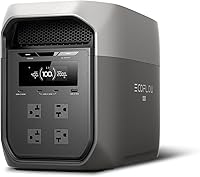
Which Extra Battery Works with the EcoFlow DELTA 2?
The EcoFlow DELTA 2 Smart Extra Battery is the correct expansion battery for the DELTA 2. Check the battery and cable model before connecting, because DELTA 2 and DELTA 2 Max use different expansion systems.
On this page (10 sections)
- Which battery works with the EcoFlow DELTA 2?
- How does an EcoFlow DELTA 2 battery expansion work?
- How many batteries can you connect to the DELTA 2?
- Is the DELTA 2 Max battery the same as the DELTA 2 battery?
- What should you check before buying an expansion battery?
- Which EcoFlow power station alternatives are worth comparing?
- How should you choose between an extra battery and a new power station?
- Can solar charging replace an extra battery?
- How should you set up and care for the extra battery?
- Is the EcoFlow DELTA 2 extra battery worth it?
The EcoFlow DELTA 2 Smart Extra Battery is the expansion battery made for the standard DELTA 2. It adds storage through the DELTA 2 expansion connection, while the DELTA 2 Max uses a different battery system.
That simple difference causes many wrong orders. Shoppers see DELTA and Max in the same name and assume every battery fits every unit.
It does not work that way in daily use. Each EcoFlow family uses its own battery design, cable and control checks.
The Smart Extra Battery is for people who already own a standard DELTA 2. It helps when one internal battery runs out too soon during an outage.
It suits homes that need a freezer, fridge or lights to run for longer. It also suits camping setups where sun and wall power may not be available all day.
You should not buy it just because you want the biggest capacity you can find. You need the battery that matches your exact station.
Check the model printed on your DELTA 2 before you add anything to a cart. Then check that the battery name mentions DELTA 2 compatibility.
Also check the cable for that battery before you connect it. A battery can be right while the wrong cable still stops the setup.
Keep the two units on a flat dry surface with space for air flow. Test the connection before an outage, not during one.
If the names are close but not exact, pause and verify first. That check saves return trips and unsafe connections.
Which battery works with the EcoFlow DELTA 2?
The DELTA 2 Smart Extra Battery is the right match for the standard DELTA 2. Choose it when you want more stored energy for backup appliances, electronics or longer off-grid use.
The battery connects to the DELTA 2 through the dedicated expansion port. Before ordering, compare the exact model name on your power station with the compatibility information for the battery and cable.
The DELTA 2 expansion system is different from the system used by the DELTA 2 Max. A battery labeled for DELTA 2 Max should not be connected to a standard DELTA 2 unless EcoFlow specifically confirms that combination.
For background on choosing a larger power station, read our guide to the best portable battery power station. It explains how capacity, output and recharge options affect backup planning.
How does an EcoFlow DELTA 2 battery expansion work?
An EcoFlow DELTA 2 battery expansion connects an extra battery to the power station so the system has more stored energy available. The extra battery does not replace the DELTA 2's internal battery, and it does not turn the unit into a higher-output inverter.
Capacity and output are different measurements. Watt-hours describe how much energy the system stores, while watts describe how much power it can deliver to connected devices.
A larger battery can help a freezer, refrigerator or other essential load run longer, but the appliance's starting demand still needs to fit the DELTA 2's output limits. Expansion improves runtime, not the maximum wattage available from the inverter.
Use the correct connection cable and seat both ends firmly before turning on the system. Our guide to the EcoFlow DELTA 2 extra battery cable covers the connection process and the cable's role.
How many batteries can you connect to the DELTA 2?
The standard DELTA 2 is designed around one compatible extra battery connection. Do not plan a chain of multiple batteries unless EcoFlow specifically supports that setup for your exact model.
The connection limit matters when comparing the DELTA 2 with the DELTA 2 Max. The DELTA 2 Max supports expansion from 2 kWh to 6 kWh with up to 2 extra batteries, according to its product information.
That does not make the DELTA 2 Max battery suitable for the standard DELTA 2. It only shows that the two product families have different expansion limits.
If you need more than one expansion battery, compare the EcoFlow DELTA 2 Max extra battery system instead. Read the model names carefully before treating the larger system as an upgrade for your current unit.
Is the DELTA 2 Max battery the same as the DELTA 2 battery?
No. The DELTA 2 Max extra battery and the DELTA 2 Smart Extra Battery belong to different expansion systems.
Similar branding does not prove that the batteries share a connector, cable or control system.
EcoFlow uses DELTA across many models, which makes the lineup easy to mix up. The word Max changes the expansion design, not just the size.
The DELTA 2 Max product information describes a 2048Wh power station with capacity expansion up to 6kWh using up to 2 extra batteries. That information applies to the DELTA 2 Max, not automatically to the standard DELTA 2.
Those numbers tell you how the Max system is built. They do not tell you a Max battery will plug into a standard DELTA 2.
The standard DELTA 2 is designed around one compatible extra battery connection. The Max can use up to 2 extra batteries in its own system.
That limit matters for planning. If you need a larger bank, you may need a different power station rather than a mismatched battery.
The standard DELTA 2 needs a battery identified for DELTA 2 compatibility. If the product name only mentions DELTA 2 Max, DELTA 3 or another EcoFlow family, stop and verify the model before buying.
Do not rely on shape alone when you compare photos online. Two black EcoFlow batteries can look alike while using different ports and software checks.
Do not force a plug or use an adapter to make a fit. Damage to a connector can leave both units unusable.
For a broader comparison of that larger unit, see our EcoFlow DELTA 2 Max review.
Read the review to learn what the Max adds on its own terms. Then return to your DELTA 2 label before you choose the Smart Extra Battery.
If you want the Max expansion path, buy a Max station and Max batteries together. That keeps the cable, limit and warranty path clear.
If you already own a standard DELTA 2, stay with its matched battery family. That is the safer path for home backup and travel use.
What should you check before buying an expansion battery?
Check the power-station model, battery model, cable and connection limit before placing an order. These four details prevent most compatibility errors.
Match the exact power-station model
Look at the label or app name for your unit. “DELTA 2” and “DELTA 2 Max” are not interchangeable names, even though both are EcoFlow backup-power products.
Avoid choosing by the word “DELTA” alone. The model suffix determines which battery family and cable system you need.
Confirm the battery family
Choose a battery that explicitly supports the standard DELTA 2. A battery for another generation may have a different connector, control system or supported capacity.
If the compatibility description is unclear, verify the model with EcoFlow before connecting it. Do not force a plug into the port or use an improvised adapter.
Check the cable
The cable must match both the battery and the power station. A cable that fits physically may still be the wrong choice for the intended system.
Keep the cable away from standing water, sharp edges and heat sources. Inspect the connectors before each setup, especially if the battery travels between home, a vehicle or a campsite.
Confirm the expansion limit
The DELTA 2 uses one compatible extra-battery connection. A larger battery bank is not always possible just because the battery has the right brand name.
Plan the system around the longest outage or trip you expect. If one extra battery still does not provide enough runtime, a larger power station may be a better fit than trying to add unsupported batteries.
Which EcoFlow power station alternatives are worth comparing?
The three products below are alternatives to an EcoFlow DELTA 2 expansion setup. They are not extra batteries for the DELTA 2, so treat them as separate power stations rather than add-on capacity.
The EF ECOFLOW DELTA 3 Max Portable Power has a 2048Wh LFP battery and 2400W output. Its listed features include 0–80% charging in 1.13 hours, 3400W X-Boost output, app control, solar input support and a 10ms transfer time.
Its dimensions are 9.4 in L x 12 in W x 19.44 in H. The box includes the power station, 1 AC charging cable, manuals and a warranty card.
The EF ECOFLOW Portable Power Station DELTA 2 Max has a 2048Wh LiFePO4 battery and 2400W output. Its product information describes expansion up to 6kWh with up to 2 extra batteries, plus AC, solar and car charging options.
The unit measures 12.2 in L x 9.7 in W x 20 in H and weighs 23 kg. It includes 1 AC charging cable and the DELTA 2 Max power station.
The EF ECOFLOW Portable Power Station River 2 Max 500 has a 499Wh LiFePO4 battery and output up to 1000W. Its listed features include 1-hour AC charging, up to 220W solar charging and a battery management system that monitors voltage, current and temperature.
It measures 10.6 in L x 10.2 in W x 7.7 in H. The box includes the RIVER 2 Max 500 power station, an AC charging cable and a quick-start guide.
How should you choose between an extra battery and a new power station?
Choose the DELTA 2 Smart Extra Battery when you already own a standard DELTA 2 and want more runtime from that system. It keeps the power station and its existing connections in place.
Choose a separate power station when you need a different output level, a newer model or a second independent source of power. A second unit can also be useful when one station must stay available while another charges.
The DELTA 3 Max suits buyers comparing a 2048Wh station with 2400W output and faster listed charging. The DELTA 2 Max suits buyers who want a 2048Wh station with expansion up to 6kWh using up to 2 extra batteries.
The RIVER 2 Max 500 suits lighter loads and shorter trips. Its 499Wh capacity is much smaller than the 2048Wh options, so compare the stored energy with the runtime you need.
For freezer planning, see our guide to the best battery backup for freezer. It focuses on the difference between starting power, running power and usable runtime.
Can solar charging replace an extra battery?
Solar charging can refill a power station, but it does not provide the same function as an extra battery. An extra battery increases stored energy, while solar panels add a way to recharge when sunlight is available.
Think of the battery as stored power you already have. Think of solar as power you may get later if the weather allows.
That timing matters during a long outage. A freezer may need power at night, when panels produce nothing.
Your best choice depends on the outage pattern. A battery helps most when you need stored power overnight or during cloudy weather, while solar input helps restore capacity during a longer event.
Both can work together in the right setup. The extra battery covers the dark hours, and solar can top up charge the next day.
Solar suits people with a place to set panels safely. It also suits campers who can place panels in open sun and watch the charge level.
It suits less well in winter, under trees or in bad weather. In those cases you may pay for panels that add little useful charge.
An extra battery suits people who want predictability. You can charge it from the wall before a storm and use it when needed.
It still needs planning for runtime. Capacity in watt-hours is not the same as the watts your appliances draw at the same time.
The DELTA 2 system also needs the correct solar input setup and panel limits. Compare those details before buying panels, and do not assume a larger panel is always compatible.
Check the input limits for your exact DELTA 2 model first. A panel that is too large can be a poor match even if the brand is the same.
Also check cable length and where the station will sit during charging. Long runs and poor sun can slow the refill more than shoppers expect.
Set panels where they get steady sun and will not be tripped over. Keep cables away from doors, water and sharp edges.
Charge the station and battery on a dry surface and watch the display. Stop and check connections if the charge does not rise as expected.
Read our guide to the best solar panel for EcoFlow DELTA 2 before choosing a charging setup. Use that guide to match panel size to your station, then decide if an extra battery still makes sense for night use.
How should you set up and care for the extra battery?
Place the DELTA 2 and extra battery on a stable, dry surface with room around the connection points. Keep the units away from water, excessive heat and anything that can block ventilation.
Connect the approved cable with both devices powered down if EcoFlow's instructions call for that procedure. Make sure the connectors are fully seated, then check the power station's display or app for the added battery.
Do not use a damaged cable, loose connector or improvised extension. Stop using the setup if you see heat damage, swelling, unusual smells or repeated connection errors.
Store the battery according to EcoFlow's current instructions. Before a planned outage, check the charge level, inspect the cable and confirm that the connected load is within the DELTA 2's output limit.
Is the EcoFlow DELTA 2 extra battery worth it?
The EcoFlow DELTA 2 Smart Extra Battery is worth choosing when you already own the standard DELTA 2 and need longer runtime from one compatible system. It is the simplest path to more stored energy, but it does not raise the inverter's maximum output or allow unlimited battery connections.
That trade-off is the whole decision. You gain time, not more power at the outlets.
Extra runtime can matter a lot for a fridge or freezer. A longer run can keep food cold through a night outage.
It can also help with phones, routers, lights and small medical devices. Those loads may run for hours without drawing huge power at once.
It will not help if your main problem is a high-draw appliance. A larger battery does not fix a load that already exceeds the inverter limit.
Pick the DELTA 2 battery expansion for a known runtime need. Pick the DELTA 2 Max system when you need its different expansion limit, and choose a separate RIVER or DELTA station when portability or independent backup matters more.
The DELTA 2 Max suits buyers who want a 2048Wh station that can expand up to 6kWh with up to 2 extra batteries. That is a different system, so compare it as a full station purchase.
The DELTA 3 Max suits buyers who want a separate 2048Wh station with 2400W output. Its listed charging and X-Boost features may fit a newer standalone setup.
The RIVER 2 Max 500 suits lighter loads and shorter trips. Its 499Wh capacity is much smaller, so it fits phones and small devices better than long freezer backup.
A second power station can also be handy when one must stay in place. You can keep one unit ready at home and move the other to a vehicle.
Before ordering, match the exact model, battery family and cable. That check matters more than choosing the largest battery name.
Set the system up and test it before you need it. Confirm the display shows the added battery and that your key loads run.
Store both units dry and check charge before storm season. Inspect the cable for wear before each use.
If you already own the standard DELTA 2, this matched battery is the cleanest upgrade. If you do not own one yet, compare full stations first.
Frequently asked questions
Which extra battery works with the EcoFlow DELTA 2?
The EcoFlow DELTA 2 Smart Extra Battery is designed for the DELTA 2. Match the battery and connection cable to the exact DELTA 2 model, and do not assume a DELTA 2 Max extra battery will work with the standard DELTA 2.
Can you use a DELTA 2 Max extra battery with a DELTA 2?
No. The DELTA 2 and DELTA 2 Max use different expansion-battery systems, so a DELTA 2 Max extra battery should not be treated as compatible with the standard DELTA 2.
Check the model name and required cable before buying.
How many extra batteries can the DELTA 2 use?
The DELTA 2 supports one compatible Smart Extra Battery through its expansion connection. The exact capacity gain depends on the battery model, so confirm the rated watt-hours before ordering.
Does the EcoFlow DELTA 2 extra battery include a cable?
Do not assume the cable is included with every battery purchase. Check the box contents and match the cable to the DELTA 2 expansion port.
EcoFlow uses model-specific connection cables, so the wrong cable may not fit or support the intended setup.