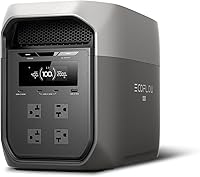
How to Connect an Extra Battery to the EcoFlow DELTA 2
Use the correct EcoFlow expansion cable for the DELTA 2 and the matching extra battery, connected with both units powered off. Check the battery model and cable type before you plug anything in, because a cable for another EcoFlow unit may not fit or charge safely.
On this page (8 sections)
- Which EcoFlow extra battery cable does the DELTA 2 use?
- How do you connect an extra battery step by step?
- Which extra batteries work with the EcoFlow DELTA 2?
- Can you connect two extra batteries to a DELTA 2?
- What safety checks matter before you plug in the cable?
- What problems happen with the wrong expansion cable?
- How do you test the setup after the first connection?
- Which EcoFlow setup fits your goal for added capacity?
Use the correct EcoFlow expansion cable for the DELTA 2 and the matching extra battery, connected with both units powered off. That short order is the core of every safe setup in this guide.
If you are shopping for more runtime, start with our guide to the ecoflow delta 2 extra battery. It helps you match the battery to the DELTA 2 before you worry about the cable.
Which EcoFlow extra battery cable does the DELTA 2 use?
The DELTA 2 uses an EcoFlow expansion cable made for its extra battery series, not a general solar or AC cable. The cable carries power and signals between the power station and the battery, so the shape and pin layout matter.
A cable that fits another EcoFlow model may look close and still be wrong. Read the label on the cable and the battery before you plug it in.
An AC charging cable brings wall power into the station. The expansion cable links the station to the battery as one system.
They are not interchangeable.
If you own a DELTA 2 Max, do not assume the same cable works. Our post on the ecoflow delta 2 max extra battery covers that different pairing and its own limits.
How do you tell the right cable from the wrong one?
Match three things: the battery model, the DELTA 2 model, and the cable label. All three should name each other or list the same series.
Look at the connector ends. If an end feels loose, needs force, or has a different pin pattern, stop.
Force can bend pins and break the port.
Keep the cable that came with your extra battery if it included one. If it is missing, check the EcoFlow manual for your exact pairing before you buy a replacement.
How do you connect an extra battery step by step?
Power off both units, connect the cable fully, then turn on the station first. This lets it read the battery at startup.
Follow these steps in order:
- Place both units on a flat, dry surface with airflow.
- Turn off the DELTA 2 and the extra battery.
- Unplug AC and solar inputs from the station.
- Connect the expansion cable to the battery first.
- Connect the other end to the DELTA 2 port.
- Push each end until seated and locked.
- Turn on the DELTA 2 and check the screen.
- Turn on the battery if it has its own switch.
Do not plug or unplug while under load. Shut down loads first.
Our walkthrough for how to use ecoflow delta 2 covers startup and everyday use.
What should you check on the screen after connecting?
Look for the extra battery icon, added capacity, and a normal charge level. The station should treat the pair as one larger system.
Check that the battery percentage makes sense. A battery stored at low charge may show a low level, and that is not a cable fault.
Charge the system and watch whether both units rise together.
Listen for odd sounds and feel for heat at the connectors. Normal warmth is common, but a hot plug, melting smell, or flickering icon means you should stop and unplug.
If the screen shows an error, power both units off, reseat the cable once, and restart. If the error stays, check the manual for that code.
Which extra batteries work with the EcoFlow DELTA 2?
Only batteries EcoFlow lists for the DELTA 2 will work correctly with its expansion port. The battery must match the voltage, connector shape, and communication protocol.
This is where many buyers go wrong. They see a larger EcoFlow battery on sale and assume it will expand a DELTA 2.
Size alone does not decide fit. The port and the system handshake decide fit.
We compared the EcoFlow units in this guide to show the range. The DELTA 3 Max is a larger 2048Wh station with 2400W output and 3400W X-Boost.
It is a different station, not a DELTA 2 battery.
The DELTA 2 Max is also a 2048Wh unit, but its listing describes expansion from 2kWh to 6kWh with up to 2 extra batteries. That shows how limits differ by model.
For a smaller need, the RIVER 2 Max 500 has a 499Wh LiFePO4 battery and 1000W output. It suits light backup, not a big DELTA 2 expansion plan.
How much extra runtime does an added battery give you?
Runtime depends on your load, not just added capacity. A fridge, fan, and phone do not drain a system the same way.
Use this simple math: divide usable watt-hours by load watts, then expect less in real use. Losses in cables, inverters, and low temperatures reduce the result.
For example, a 100W load on 1000Wh of usable energy gives about 10 hours before losses. A 500W load on that same energy gives about 2 hours.
Your actual numbers will vary.
That is why the right cable matters more than the biggest battery. A mismatched pair may not charge at all, while a matched pair lets you plan around real loads.
If you want a broader view before you choose a station, our best portable battery power station guide compares sizes and use cases.
Can you connect two extra batteries to a DELTA 2?
Do not chain two batteries unless EcoFlow lists that setup for your DELTA 2. Some stations allow two.
Others allow one.
Trust your manual.
Chaining adds more ports, cable weight, and connection points. Each link must be rated for the system.
If allowed, follow the manual order. Do not guess from photos of another model.
The first battery often links to the station.
If only one is allowed, stop at one. An unlisted hub can cause errors or damage.
A larger station may be safer.
The DELTA 2 Max can expand to 6kWh with up to 2 extra batteries. That shows limits differ by model.
What if you need more than one extra battery?
Switch to a station rated for your target capacity, or run a second system for separate loads. That choice avoids forcing a DELTA 2 past its listed limit.
For home backup, split loads between two stations. Keep the fridge on one system and lights, phones, and fans on the other.
This keeps setup simple and limits cable runs.
For outdoor use, think about weight first. Each battery adds bulk and may need its own cable.
A larger single station can be easier to move than a station plus two batteries.
Our roundup of the best portable power station ecoflow helps you compare larger EcoFlow options when one battery is not enough.
What safety checks matter before you plug in the cable?
Check charge level, temperature, ports, and cable before each connection. A quick inspection prevents most problems.
Look for bent pins, cracked plastic, frayed jackets, and dirt. Clean ports with a dry cloth only.
Never use water or spray cleaner inside.
A stored battery may sit low. Charge it after a safe connection, following storage steps in your manual.
Keep units dry and ventilated. Never connect on wet grass, in rain, or in a sealed box while charging.
Replace damaged cables. Never tape damaged ends and keep using them.
Store cables dry and loosely coiled.
What problems happen with the wrong expansion cable?
A wrong cable can fail to connect, throw errors, or damage ports. The risk is more than just not working.
Some fit but lack signal pins. The station may see no battery.
Others carry power without communication, so charge cannot balance.
Never force a connector. Bent pins can stop even the right cable seating.
Stop at first resistance.
A solar cable is not an expansion cable. It carries panel power only.
It cannot replace battery communication.
When replacing, buy the cable EcoFlow lists for your exact pair. Check the title and manual for your battery name.
How do you test the setup after the first connection?
Run a short test with a known load before relying on it. Charge the system, plug in one appliance, and watch the screen.
Start with a fan, light, or phone charger. Check watt draw looks normal.
Then try a larger load and check cable temperature.
For backup use, unplug AC power. Confirm your fridge switches without long delay.
The DELTA 3 Max lists under 10ms transfer, but check your DELTA 2 manual.
Note your battery model, cable type, and order. That helps with support or replacements.
Test AC and solar charging if you will use both. Watch both percentages rise together.
Which EcoFlow setup fits your goal for added capacity?
For a DELTA 2, use a listed battery with its correct expansion cable. For larger goals, compare a station built for more capacity.
The RIVER 2 Max 500 gives 499Wh and 1000W. It weighs 13.3 lb, so it suits phones, lights, and small appliances.
The DELTA 3 Max gives 2048Wh, 2400W output, and 3400W X-Boost. EcoFlow says it charges 0 to 80 percent in 1.13 hours.
The DELTA 2 Max gives 2048Wh, 2400W output, 15 outlets, and expansion to 6kWh with up to 2 batteries.
For the DELTA 2, match the battery, match the cable, and connect with both units off. That protects ports and delivers the runtime.
Frequently asked questions
What cable connects an extra battery to the EcoFlow DELTA 2?
Use the EcoFlow expansion cable made for your exact extra battery and DELTA 2 model. Check the battery name, cable label, and connector shape before connecting.
Do not use a solar cable, AC charging cable, or a cable meant for a different EcoFlow series unless EcoFlow lists it for your pairing.
Should the DELTA 2 be off when I add an extra battery?
Yes. Power off the DELTA 2 and the extra battery before you connect or remove the expansion cable.
This avoids arcing, error codes, and damage to the ports.
Turn both units back on only after the cable is fully seated and locked in place.
Can I chain two extra batteries to one DELTA 2?
Only if EcoFlow lists that exact setup for your DELTA 2 and battery model. Some systems allow one extra battery, while larger units allow more.
Check the manual for your unit before you assume a daisy chain will work, because the limit affects charging and runtime.
Why does the extra battery not show up after I connect it?
Check that both units are off during the swap, then restart them after the cable is seated. Try a firm reseat of each end, confirm you used the right cable, and check battery charge and temperature.
If it still does not appear, stop and check the manual or contact EcoFlow support.